IDrive® e2 MCP for AI Applications
Enable AI assistants and development tools to securely access your IDrive® e2 buckets using the Model Context Protocol (MCP).
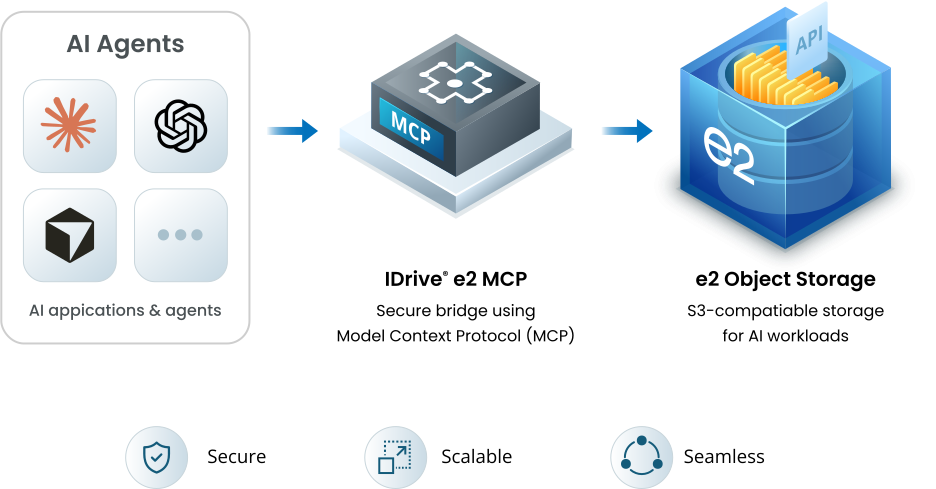
Connect AI agents directly to your object storage
Connect AI assistants and autonomous agents to IDrive® e2 using the open Model Context Protocol (MCP). Give AI applications a secure, standards-based way to work with your object storage using natural language—without building custom integrations.
One MCP connection. Multiple ways to deploy
IDrive® e2 MCP gives you the flexibility to choose how the MCP server fits into your environment.
Hosted MCP
Connect without managing infrastructure
Use the IDrive® e2-hosted MCP service to connect your AI application to your storage without deploying or maintaining an MCP server.
- No server installation or maintenance
- Quick setup with a hosted MCP endpoint
- OAuth-based authentication
- Ideal for getting AI workflows up and running quickly
Self-Hosted MCP
Run IDrive® e2 MCP in your own environment
Deploy and operate the MCP server in your own environment. Install the package and follow the setup instructions to get started.
- Full control over your MCP server configuration
- Connect to IDrive® e2 from your own infrastructure
- Ideal for regulated or compliance-sensitive environments
Why choose IDrive® e2 MCP?
Built for AI. Designed for flexibility.
AI-ready object storage
Connect AI assistants and autonomous agents directly to the data stored in your IDrive® e2 buckets. Turn object storage into an accessible part of your AI workflows.
Open by design
Built on the open Model Context Protocol, IDrive® e2 MCP lets you work with a growing ecosystem of MCP-compatible AI applications instead of tying your workflows to a single AI platform.
Secure access
Use OAuth-based authentication for hosted connections and control what your AI applications can access. Review and revoke connected application permissions when needed.
More AI capability. Fewer storage costs
Secure OAuth authentication
AI applications authenticate using short-lived OAuth tokens. Your IDrive® e2 access keys and credentials remain encrypted and are never shared with the AI application.
Natural language usage
Use everyday language to create buckets, manage objects, generate pre-signed URLs, enable Object Lock, and perform other supported storage operations.
Granular access control
Approve only the permissions an AI application needs. Review or revoke access for connected applications at any time.
Use with existing AI apps
Connect Claude, Cursor, Codex, and other MCP-compatible AI applications using a single standards-based protocol.
Who's this for?
IDrive® e2 MCP is designed for anyone who wants to connect AI applications directly to object storage.
- AI Developers:
Build AI-powered applications that can securely interact with object storage without creating custom integrations. - Software Engineers
Automate repetitive storage operations, simplify workflows, and reduce development effort. - DevOps & Platform Teams:
Manage buckets, objects, and storage resources using AI assistants while maintaining secure access controls. - Data & AI Teams:
Use AI to search, organize, analyze, and manage content stored in IDrive® e2.
How it works
Hosted MCP
Getting started with the Hosted MCP requires only your IDrive® e2 account and an MCP-compatible AI application.
Add the MCP endpoint
Configure your AI application with the IDrive® e2 MCP endpoint.
Sign in
Authenticate using your IDrive® e2 account.
Grant permissions
Configure session timeout and access permissions for the AI application
Start using AI
The AI application can now perform storage operations using the permissions you've granted.
Configuration Guides
Self-hosted MCP
- Install the Self-hosted MCP package
Install globally to use the command:Or install it in a Node.js project:npm install --global @idrivee2/s3-mcpnpm install @idrivee2/s3-mcp - Run the agent after installation:
idrivee2-s3-mcp
Configuration Guides
What can you do
IDrive® e2 MCP is designed for anyone who wants to connect AI applications directly to object storage.
- AI-powered Storage Management:
Create buckets, browse objects, and manage storage resources using natural language. - Secure File Sharing:
Generate pre-signed URLs for objects directly from your AI assistant. - Storage Automation
Simplify routine storage operations and repetitive administrative tasks. - Content Analysis
Summarize, categorize, or extract information from documents stored in your buckets.
IDrive® e2 MCP Use Case
Connect your AI application to IDrive® e2 today
Get StartedFAQs
What is IDrive® e2 MCP?
IDrive® e2 MCP connects compatible AI applications to your IDrive® e2 object storage using the open Model Context Protocol (MCP). It enables AI clients to securely access and manage your storage using natural language.
Which AI applications are supported?
IDrive® e2 MCP works with AI applications that support the Model Context Protocol (MCP), including ChatGPT, Claude, Cursor, Codex, and other compatible clients.
Is my data secure?
Yes. IDrive® e2 MCP uses OAuth-based authentication. You control the permissions granted to each application and can revoke access at any time.
What storage operations are supported?
Depending on the permissions you grant, AI applications can create buckets, browse objects, upload and download files, generate pre-signed URLs, enable Object Lock, retrieve metadata, and perform other supported storage operations.
Do I need to write code?
No. IDrive® e2 MCP uses the open Model Context Protocol, allowing compatible AI applications to connect without custom integrations.
Can I revoke access later?
Yes. You can review and revoke access for any connected AI application from your IDrive® e2 account at any time.